
Sattvayan - A Journey Toward Purity and Balance. Started building Sattvayan on 21 June 2025 - International Yoga Day.

#Meaning of Sattvayan
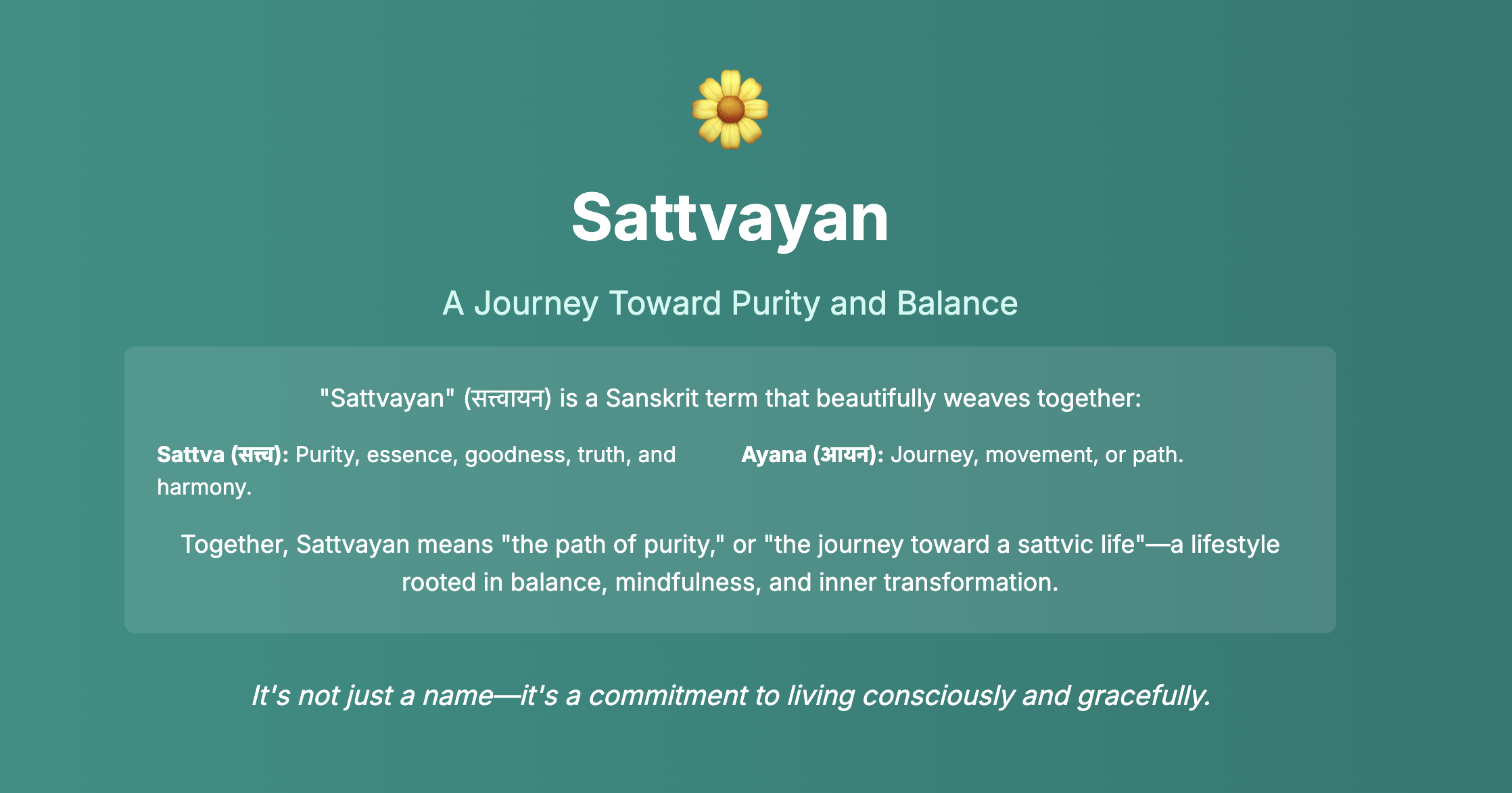
Sattvayan means "the path of purity," or "the journey toward a sattvic life"—a lifestyle rooted in balance, mindfulness, and inner transformation.
Choosing the right path is your choice. Let's get started on the learnings while building it. Here’s a refined and structured version of building Sattvayan, making it engaging and informative for readers:
#Ideation
#Product Name: Sattvayan
Meaning: Sattvayan is derived from “Sattva” (purity, harmony, balance in Sanskrit) and “Yaan” (vehicle/journey) — representing a mindful journey towards wellness.
#Why Sattvayan?
The Inspiration: Born out of a need for meaningful side projects and passion-driven work, Sattvayan emerged as a collaborative side gig between like-minded individuals who believe in the power of yoga and wellness. It aims to bridge the gap between digital access and traditional wisdom.
The Vision: To create a one-stop platform for yoga and wellness enthusiasts, bringing together resources, community, opportunities, and learning under one serene digital roof.
#What Problem Does It Solve?
Few thoughts during the brainstorming that we have written for prioritizing features as we move on. Sattvayan is a digital wellness ecosystem with a multi-dimensional approach:
-
Knowledge Sharing via Blogs: Share tips, yoga routines, nutrition advice, and meditative insights.
-
Learning Through Workshops & Conferences: We aim to deliver structured online workshops by certified yoga professionals.
-
Daily Yoga Tips and Microlearning: Quick tips and insights, following the model of short-series content.
-
Job Board for Yoga Professionals: A niche job platform tailored for certified yoga instructors and wellness centers.
-
Community Forum: A moderated community space — Sattvayan Forum — for experience sharing, Q&A, and discussion.
#How Did We Begin?
Tools of the Trade:
- We started with visual thinking — using draw.io to create early mind maps, user journeys, and architecture diagrams.
- Brainstormed ideas collaboratively and documented them for clarity and versioning.
- Defined Minimum Viable Features (MVF) for each module before writing any code.
Here’s a polished and structured version of your Getting Started section for the Sattvayan blog:
#Getting Started
Bringing Sattvayan to life began with choosing the right tools, enforcing consistency, and setting up a development workflow that scales well with collaboration.
#Tools of the Trade
Framework: We chose Laravel, a modern PHP framework known for its expressiveness and developer experience.
 1laravel new sattvayan
 2git init
 3git add .
 4git commit -m "initial commit"
 5cd sattvayan
 6mkdir docs
Create a file named sattvayan.draw.io inside the docs folder — this is where all brainstorming, architecture sketches, and system diagrams are maintained.
#Development Environment Setup
To ensure quality and collaboration, we set up:
✅ Mandatory:
- Code Style Rules
- Static Code Analysis
- CI/CD Pipelines
🌿 Good to Have:
- Observability (e.g., Laravel Nightwatch)
- Containerization
#Code Quality and Automation
🔧 Install Duster
Duster bundles the best tools for Laravel projects:
- Laravel Pint
- TLint (Blade templates)
- PHP_CodeSniffer
- PHP CS Fixer
1composer require tightenco/duster --dev
🤖 Automate Code Quality Checks
-
GitHub Actions Automatically run linters/fixers on every push or pull request:
1./vendor/bin/duster github-actions -
Husky Hooks Run linters before committing locally to reduce CI noise:
1./vendor/bin/duster husky-hooks
#Prettier Integration
For consistent frontend styles (CSS, HTML, JS):
-
Create a
.prettierrcfile:1{ 2 "printWidth": 120, 3 "singleQuote": true, 4 "tabWidth": 2, 5 "trailingComma": "es5" 6} -
Create a
.prettierignorefile (you can just copy.gitignorecontents) -
Add lint-staged config in
package.json:1{ 2 "*.css": ["prettier --write"] 3} -
Add Prettier GitHub Action:
.github/workflows/prettier.yml1name: Prettier 2 3on: [push, pull_request] 4 5jobs: 6 format: 7 runs-on: ubuntu-latest 8 steps: 9 - uses: actions/checkout@v2 10 - name: Install Node.js 11 uses: actions/setup-node@v2 12 with: 13 node-version: '16' 14 - run: npm install 15 - run: npm run format -
Add a script to
package.json:1"scripts": { 2 "format": "prettier --write ." 3}
💡 Tip: Prettier plugins in IDEs (e.g., VS Code) help maintain clean code before the commit stage.
#Developer Experience Enhancements
-
Mail Testing While Laravel’s log mail driver is okay, MailPit offers a modern, GUI-driven local email testing environment.
-
Debugging Add the Laravel Debugbar:
 1composer require barryvdh/laravel-debugbar --dev
 2php artisan vendor:publish --provider="Barryvdh\Debugbar\ServiceProvider"
This gives real-time insights into queries, routes, and performance — great for local development.
Here’s the next section of your blog — covering SaaS Auth Setup using Laravel Breeze — written in a clear and informative style consistent with your previous sections:
#SaaS Authentication Setup
For Sattvayan, we needed a lightweight yet modern authentication system that could grow with the product — without the overhead of Jetstream or Fortify in the early phase.
Laravel Breeze was the perfect fit.
#Why Laravel Breeze?
Breeze offers minimal authentication scaffolding with clean Blade templates (or optionally Vue/React), built with Tailwind CSS, and supports customization out of the box. It gives you the essentials — registration, login, password reset, and email verification — without locking you into a specific stack.
#Getting Started with Breeze
🧩 Install Laravel Breeze
1composer require laravel/breeze --dev
🏗️ Scaffold the Authentication UI
1php artisan breeze:install
The installer prompts:
 1Which Breeze stack would you like to install? > Breeze with Alpine
 2Would you like dark mode support? > yes
 3Which testing framework do you prefer? > Pest
✅ We opted for Blade + Alpine.js for now — keeping things simple while ensuring dark mode and testing support.
✅ Run the Tests
1php artisan test
🔄 Commit the Auth Setup
 1git add .
 2git commit -m "feat: Minimal Laravel authentication scaffolding with Blade, Vue, or React + Tailwind."
Laravel Breeze gets us off the ground quickly, leaving us in full control to extend and evolve the UI/UX as Sattvayan matures into a fully-fledged SaaS platform.
Here’s a new section to be added to your existing blog “The Inspiration Behind Sattvayan: Building with Intention”, focusing on sharing progress and learnings through a developer blog powered by Prezet:
#Sharing the Journey: Developer Blog with Prezet
As Sattvayan started to take shape, one thing became clear — building in public wasn't just a marketing move; it was part of the philosophy. Sharing the learnings, decisions, and even mistakes is a way to connect with fellow developers, future collaborators, and maybe even the next wave of contributors.
#🚀 Why a Blog?
We wanted more than just documentation. We wanted a space to:
- Reflect on technical decisions
- Capture milestones and pivots
- Create value for other developers exploring Laravel, SaaS, or wellness-based products
- Encourage open-source storytelling, without distractions
#✨ Enter Prezet: Blogging for Laravel
We chose Prezet — a modern markdown-based blogging system for Laravel — that lets us ship developer content, fast.
🔧 Installation Steps
 1composer require prezet/prezet
 2php artisan prezet:install
 3
 4composer require prezet/blog-template --dev
 5php artisan blog-template:install
📁 Project Structure After Setup
 1your-laravel-app/
 2├── app/Http/Controllers/Prezet/       # Blog controllers
 3├── routes/prezet.php                  # Dedicated blog routes
 4├── resources/views/prezet/            # Blade views for blog pages
 5├── prezet/                            # Markdown blog content
 6├── package.json                       # Updated with Prezet dependencies
 7└── vite.config.js                     # Updated for Prezet’s Tailwind setup
#🧠 Keeping the Index Fresh
To keep blog entries in sync with markdown changes:
1php artisan prezet:index
Run this whenever you:
- Add a new blog post
- Edit frontmatter metadata
- Rename or update slugs
#🖼️ Optimized Image Handling
Prezet ships with a smart ImageController that dynamically serves resized and optimized image assets:
 1Route::get('prezet/img/{path}', ImageController::class)
 2    ->name('prezet.image')
 3    ->where('path', '.*');
So when a browser requests something like:
1/prezet/img/blog-images/sattvayan-480w.webp
Prezet returns a responsive, WebP-optimized version — giving readers a fast, device-appropriate experience.
#✍️ Writing as We Build
This blog will serve as the living storybook of Sattvayan's journey — covering:
- Product decisions
- Architecture choices
- DevOps experiments
- Mistakes and learning curves
The product may change, but the blog will keep the soul visible.
#🧗 Mistakes and Learning Curves
As much as Sattvayan is about clarity and intention, it’s also a story of missteps, recoveries, and course-corrections. One of the earliest and most valuable lessons came from a tool that politely but firmly told us:
“Hey, you’re doing wrong.”
#✅ The TLint Wake-Up Call
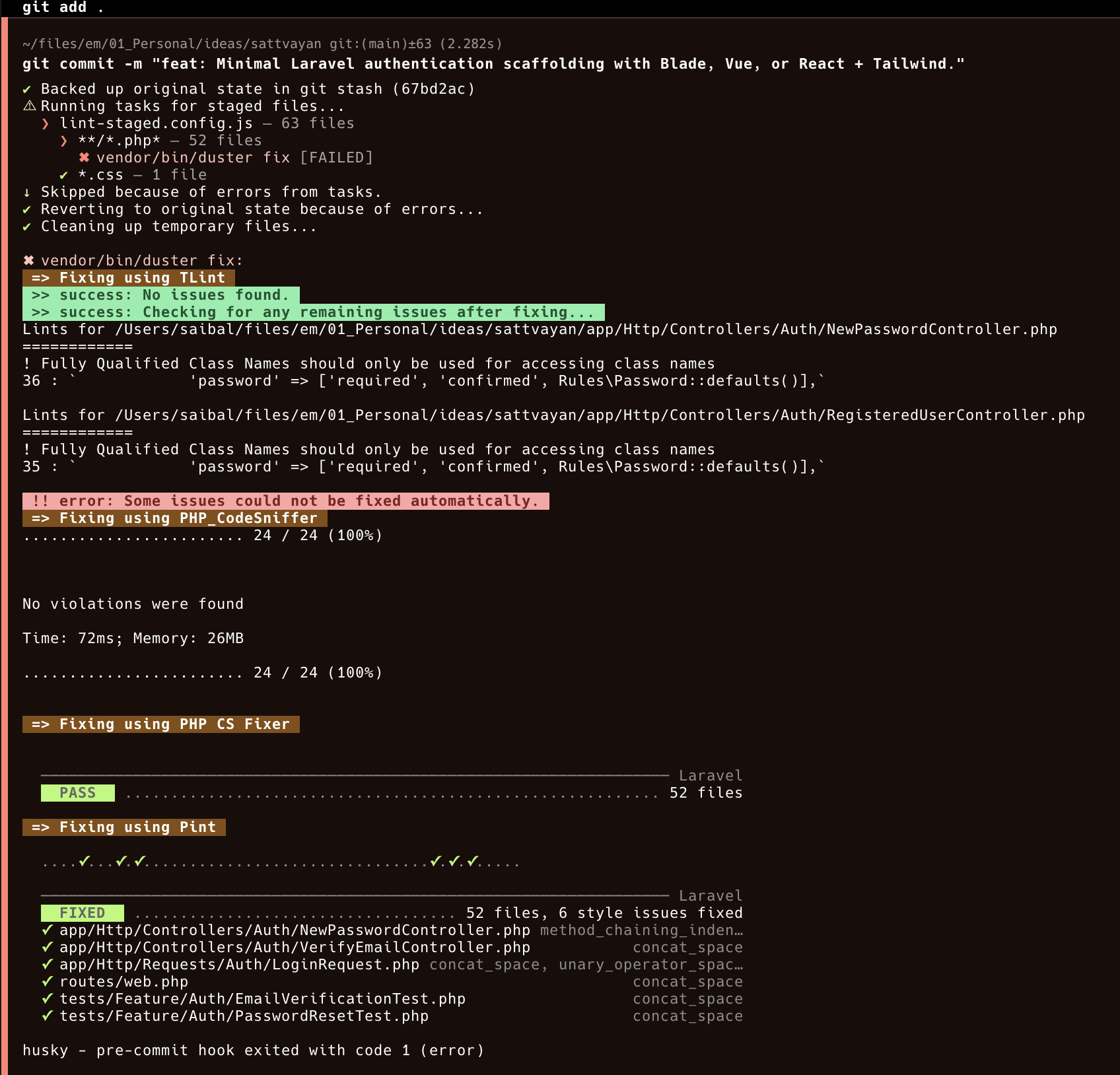
In the early commit cycles, we wired up Duster for automated code style enforcement — integrating Pint, PHP CS Fixer, PHP_CodeSniffer, and TLint into both GitHub Actions and Husky hooks.
Here’s what happened on a commit:
#What TLint Caught
- ⚠️ We were using Fully Qualified Class Names like
Rules\Password::defaults()directly inside array definitions. - TLint flagged this and suggested that importing the class via
usestatements was the Laravel-recommended way — enhancing readability and aligning with Laravel conventions. - Other tools like Pint and PHP CS Fixer cleaned things up automatically, but TLint offered semantic, Laravel-specific suggestions.
#Why This Mattered
- TLint isn't just a formatter — it's a Laravel opinion enforcer.
- It made us rethink how to write Laravel idiomatically, not just syntactically.
- Combined with husky pre-commit hooks, it stopped bad code before it could leave the machine.
#The Learning
Don’t wait until CI to fix your code. Fail fast, fix early.
Using TLint with Duster as part of a developer-first workflow ensures:
- Cleaner commits
- Fewer formatting PR comments
- A healthier codebase from day one
“Catch small issues early, and you avoid big rewrites later.”
#📦 Processing Static Assets Correctly with Vite in Laravel
In the middle of wiring up our welcome screen, we hit an annoying blocker: a Vite asset that just wouldn’t show up.
❌ The Error
 1Illuminate\Foundation\ViteException
 2Unable to locate file in Vite manifest: resources/images/sattvayan.svg
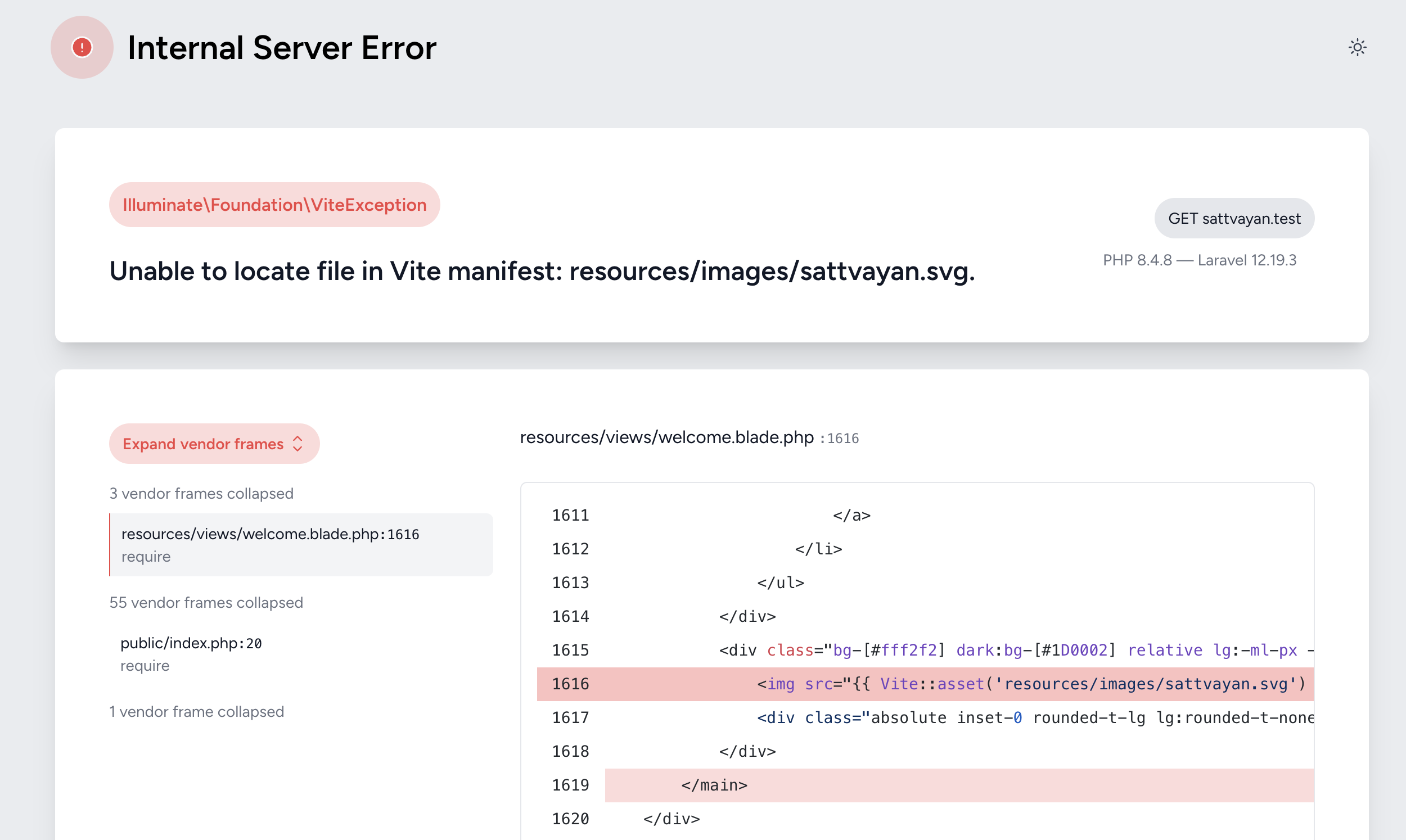
We were using:
1<img src="{{ Vite::asset('resources/images/sattvayan.svg') }}">
It seemed right, but Laravel and Vite didn’t agree. Why?
#✅ The Fix — Understanding Vite’s Static Asset Handling
According to the official Laravel Vite docs, have a read if needed.
To make Vite process and version static assets used only in Blade, we needed to explicitly import them in our app's entry file:
Update resources/js/app.js:
1import.meta.glob(['../images/**', '../fonts/**']);
Now, running npm run build will properly version these assets and allow this to work:
1<img src="{{ Vite::asset('resources/images/sattvayan.svg') }}">
#🔄 Bonus: Auto-refresh on Save
For a smoother Blade dev experience, we enabled hot reload by adding this to vite.config.js:
1refresh: true;
Now Vite refreshes the browser when we update
.blade.phpfiles — perfect for frontend development in Laravel!
This made our static asset pipeline clean, reliable, and version-aware — exactly what we needed for a polished frontend experience.